Introduction
If your firm is evaluating alternatives for field data management and technical reporting, you are not alone. Across geotechnical engineering and construction materials testing (CMT), teams are increasingly moving away from legacy software that feels expensive, slow to adapt, and misaligned with how work actually happens in the field and lab.
Many traditional geotechnical data management platforms were designed years ago and struggle to keep up with modern expectations. Common challenges include high per-user pricing, limited flexibility for forms and reports, disconnected GIS and boring log workflows, and reporting processes that still rely on exporting data into Word or PDF tools.
Aldoa is a modern, cloud-based platform built specifically for geotechnical and CMT teams. It combines field and lab data management, automated technical reporting, GIS and mapping, soil boring log workflows, dashboards, and AI-powered productivity tools into a single system. In this updated comparison, we break down how Aldoa compares to existing solutions across pricing, usability, reporting, data workflows, and speed to value, so you can evaluate what best fits your team’s needs.
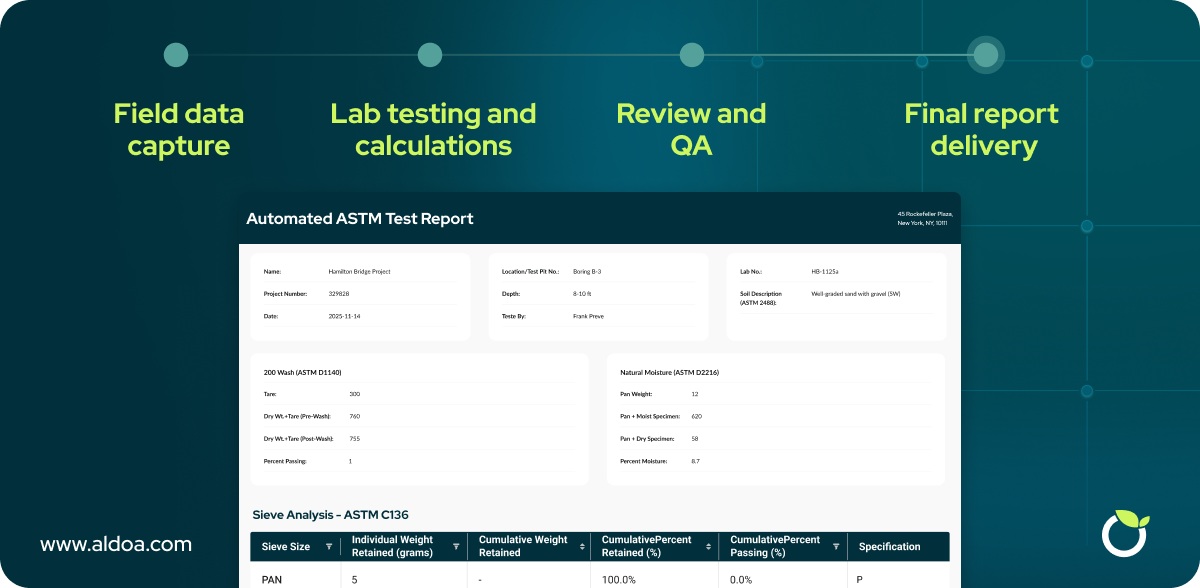
Why Firms Compare Geotechnical Data Management Software
Legacy platforms helped digitize field workflows, but many firms now hit the same limits:
- High per user pricing that scales poorly for larger technician teams
- Slow form and template changes, often requiring long implementation queues
- Opaque feature add ons, with extra charges for common needs
- Limited GIS and mapping, forcing teams into workarounds
- Reporting friction, where data still gets copied into Word or PDF tools
For geotechnical and CMT firms, the cost is not just dollars. It is time. Every hour spent re entering data, chasing missing fields, or waiting on template updates is an hour that slows projects and drains margins.
Aldoa is a modern alternative built from the ground up to reduce cost, increase flexibility, and accelerate field-to-office workflows—while actively working with firms like yours to shape the product roadmap.
Common Problems With Legacy Geotechnical Data Management Tools
Many geotechnical and CMT firms begin evaluating new software after running into the same limitations with legacy data management tools. While these platforms helped digitize early field workflows, they often struggle to support the scale, speed, and complexity of modern projects.
Desktop-first tools that struggle in the field: Many legacy systems were designed primarily for office use, with field workflows added later as an afterthought. As a result, mobile data collection can feel clunky, slow, or disconnected from how technicians actually work onsite. This leads to incomplete data, workarounds, and added cleanup once data reaches the office.
Per-user pricing that limits adoption: High per-user pricing is a common barrier for firms with large field teams. When every technician adds significant cost, companies often limit access or share logins, reducing data quality and visibility. Instead of enabling broad adoption, pricing structures can actively discourage it.
Disconnected systems for core workflows: It is common for firms to rely on separate tools for soil boring logs, field data collection, lab data management, and technical reporting. These disconnected systems create manual handoffs, duplicate data entry, and inconsistencies that increase risk and slow delivery.
Limited GIS and mapping capabilities: Many legacy platforms offer basic location tagging but fall short when projects involve multiple sampling locations, corridors, or large geographic areas. Teams are forced to split projects or manage mapping outside the system, making it harder to visualize progress and maintain context.
Manual, error-prone reporting workflows: Even when data is captured digitally, reporting often still requires exporting tables and results into Word or PDF templates. This manual process introduces formatting issues, increases the chance of errors, and adds unnecessary time to every deliverable.
These challenges are not just technical inconveniences. They directly impact turnaround time, data quality, staff efficiency, and project margins. For many firms, they are the primary drivers behind searching for a modern alternative to legacy geotechnical data management software.
Pricing: More Transparent, Flexible, and Affordable
Existing solutions: high base costs plus hidden fees
Pricing is one of the most common reasons firms start looking for alternatives. Many legacy tools charge high per user rates, and then layer on costs for everyday actions like signatures, configuration, or custom templates.
For teams with large field crews, this can quickly turn a platform into a financial constraint.
Aldoa pricing: simpler structure, no surprise charges
Aldoa offers straightforward per user pricing without pay per use fees. Core differentiators include:
- Lower per user monthly pricing
- Unlimited e signatures included
- No extra charge for form templating or configuration
- Free onboarding support and templating services
The goal is predictable cost at scale, especially for firms that depend on broad field adoption.
Want to see how Aldoa compares for your workflows? Schedule a walkthrough with real project examples.
Feature Comparison: Existing Solutions vs Aldoa
Core capabilities at a glance
- Field data collection: Both provide mobile or digital collection
- Automated report generation: Aldoa is fully integrated with field and lab data
- Custom form creation: Aldoa includes fast, free templating support
- e signatures: Aldoa includes unlimited signatures with no add ons
- Geolocation and mapping: Aldoa includes deep Google Maps based workflows
- Soil boring logs: Aldoa supports native boring log workflows co developed with firms
- In platform PDF editing: Aldoa lets teams edit and finalize reports inside one system
- Dashboards and queries: Aldoa supports advanced cross project analytics
- AI tools: Aldoa includes workflow focused AI in the platform
This is the difference between point solutions and a connected field and lab data management platform.
Core Capabilities at a Glance
| Feature |
Existing Solutions |
Aldoa |
| Field Data Collection |
✔️ Yes |
✔️ Yes |
| Automated Report Generation |
✔️ Yes (with configuration) |
✔️ Fully integrated |
| Custom Form Creation |
⚠️ Requires implementation |
✔️ Free templating support |
| eSignature Support |
⚠️ Extra fees or limits |
✔️ Unlimited, included |
| Geolocation & Mapping |
⚠️ Limited GIS features |
✔️ Deep Google Maps integration |
| Soil Boring Logs |
❌ (external tools often needed) |
✔️ Yes, co-developed with clients |
| PDF Editing In-Platform |
❌ |
✔️ Edit reports directly within Aldoa |
| Custom Dashboards & Queries |
⚠️ Basic |
✔️ Advanced cross-project queries |
| AI Tools |
❌ |
✔️ In beta: smart suggestions, report summarization |
Geotechnical and CMT Specific Capabilities
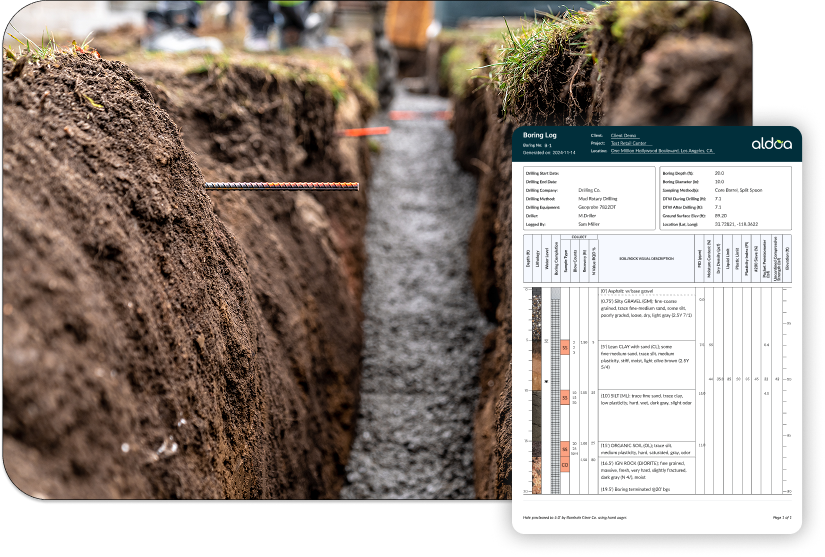
Soil boring logs built for real workflows
One major gap in many legacy systems is the lack of native soil boring log tools. Teams often rely on separate software, spreadsheets, or manual drafting, then stitch results into reports later.
Aldoa’s soil boring log functionality is being built with geotechnical teams to ensure it:
- Aligns with ASTM and common client standards
- Is customizable to each firm’s preferences
- Feeds directly into geotechnical site investigation reports
- Stays consistent across projects and offices
Because Aldoa co-develops with users, updates roll out quickly and reflect what teams actually need.
Advanced GIS and mapping for multi location projects
Many platforms stop at basic GPS tagging. Aldoa goes deeper for firms that manage large sites or many sampling points:
- Multiple GIS locations per project so you do not need to split projects artificially
- Google Maps integration to visualize drilling and sampling locations by coordinate or address
- Project level mapping views for faster context, QA, and status tracking
For multi site or corridor projects, this turns GIS into a daily workflow tool, not a nice to have.
Reporting That Stays Inside One Platform
Existing approach: export, copy, format, repeat
Even when legacy tools capture field data digitally, technical reporting often still happens outside the system. Data is exported into Word templates or separate PDF software, tables are copied and reformatted, and signatures are added manually. Each handoff introduces friction, slows turnaround, and increases the risk of errors or mismatched values.
For geotechnical and CMT teams delivering high volumes of reports, this repetitive work adds up quickly.
Aldoa approach: edit, generate, and deliver in one place
Aldoa supports in-platform technical reporting, keeping field data, lab results, and final deliverables connected from start to finish. Instead of moving data between tools, teams complete the entire reporting workflow inside a single platform.
With Aldoa, teams can:
-
Edit reports directly inside Aldoa
-
Drag and drop structured data into pre-built report templates
-
Automatically insert dynamic tables, calculations, test results, and signatures
-
Generate Word or PDF deliverables that are ready to send to clients
Because reports are powered by structured data, updates flow through automatically. When data changes, reports stay in sync.
Example workflow: a concrete test report
A typical concrete test report in Aldoa looks like this:
Field data collection: A field technician completes sampling and testing forms digitally, capturing all required observations and measurements at the job site.
Lab review and validation: Lab data is reviewed, validated, and approved within Aldoa, ensuring results meet project and specification requirements before reporting begins.
Automatic report population: Tables, calculations, and required signatures populate automatically in the report template using the approved field and lab data.
Project manager review and delivery: The project manager reviews and finalizes the report directly inside Aldoa and generates a client-ready PDF or Word document.
No copy-paste. No formatting cleanup. No risk of mismatched values between systems.
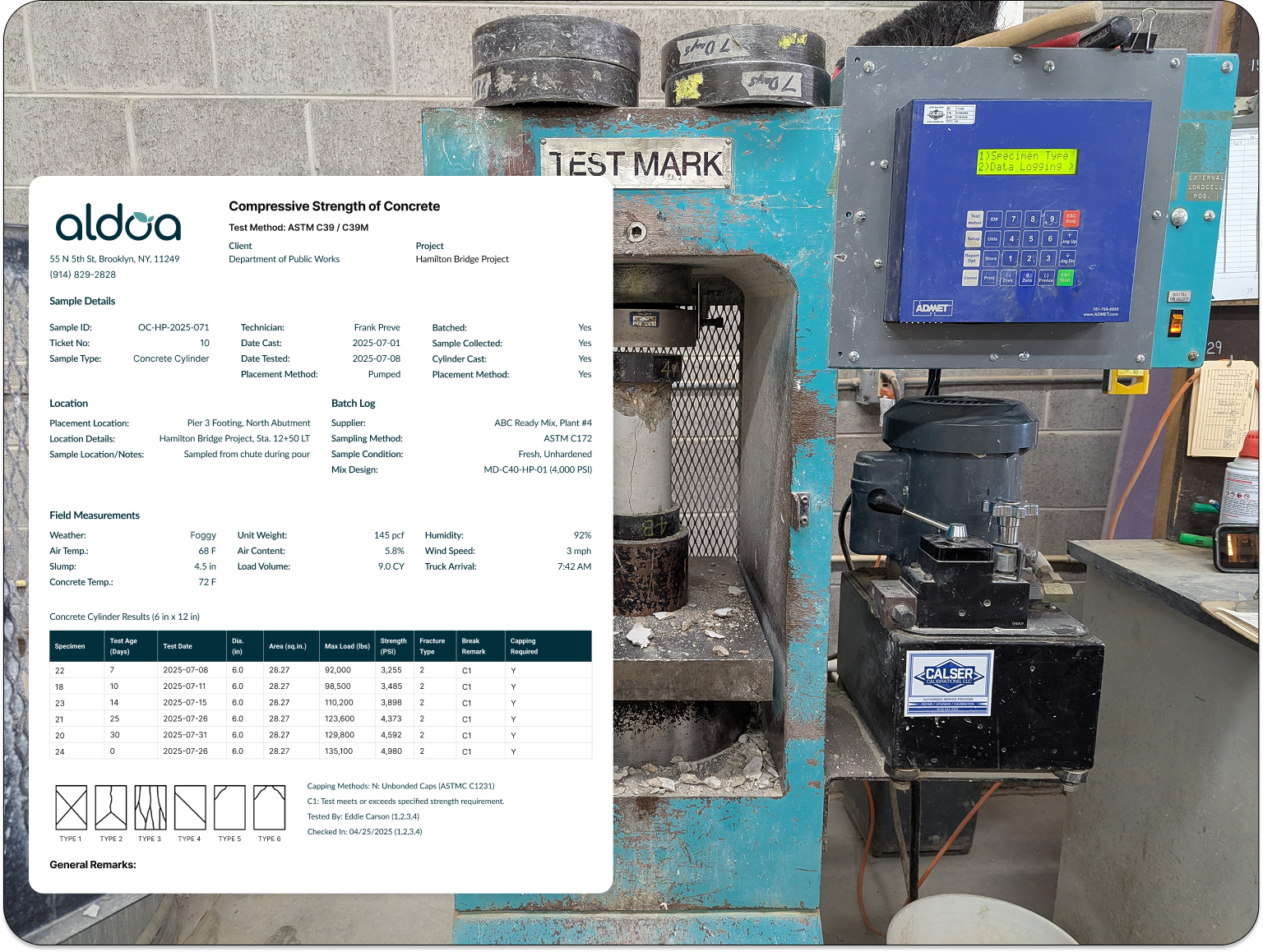
When reporting stays inside one platform, turnaround times shrink, quality improves, and teams spend less time fixing reports and more time delivering projects.
Implementation, Onboarding, and Time to Value
Switching geotechnical data management or technical reporting software does not have to mean months of disruption. Aldoa is designed for fast rollout, minimal downtime, and real adoption across field and office teams.
Instead of long implementation cycles and heavy consulting fees, Aldoa focuses on getting teams productive quickly:
-
Guided onboarding with real humans who understand geotechnical and CMT workflows
-
Free form and report templating based on your existing field forms and deliverables
-
Parallel run support so teams can transition without disrupting active projects
-
Role-based training for field technicians, project managers, and lab staff
Most firms see usable, production-ready workflows live in weeks, not quarters. This faster time to value allows teams to standardize workflows, improve data quality, and realize efficiency gains without a drawn-out implementation process.
Customization and Speed to Value
Existing solutions: long waits for form deployment
Firms often cite slow turnaround for new or modified forms. Waiting months for a field form update is a serious blocker for project driven teams.
Aldoa: fast, free templating
Aldoa takes a different approach:
- Aldoa templates your forms at no extra cost
- Most forms go live in days, not months
- Feedback loops are direct with the product team
- Design partners influence what ships next
This reduces time to value and keeps the platform aligned with your evolving workflows.
Many firms want visibility beyond a single project. Examples:
- Compare failing cylinders by region
- Track density compliance across supervisors
- Identify recurring spec issues by client type
- Summarize production by crew or month
Legacy tools may provide basic reporting, but advanced cross project queries are limited.
Aldoa enables:
- Custom dashboards by client, project type, location, or timeframe
- SQL like querying to find specific test conditions or anomalies
- Rollups across teams, regions, and time windows
This helps firms improve quality control, standardize delivery, and spot issues early.
Aldoa AI Features That Save Time and Reduce Errors
AI only matters when it removes real friction. Aldoa AI is built into field and reporting workflows, including:
- AI voice dictation for field notes so technicians can capture observations hands free, faster, and with more detail
- Real time field validation that flags missing or out of range values before a tech leaves the site
- Automatic report population that pushes validated field and lab data into your report templates instantly
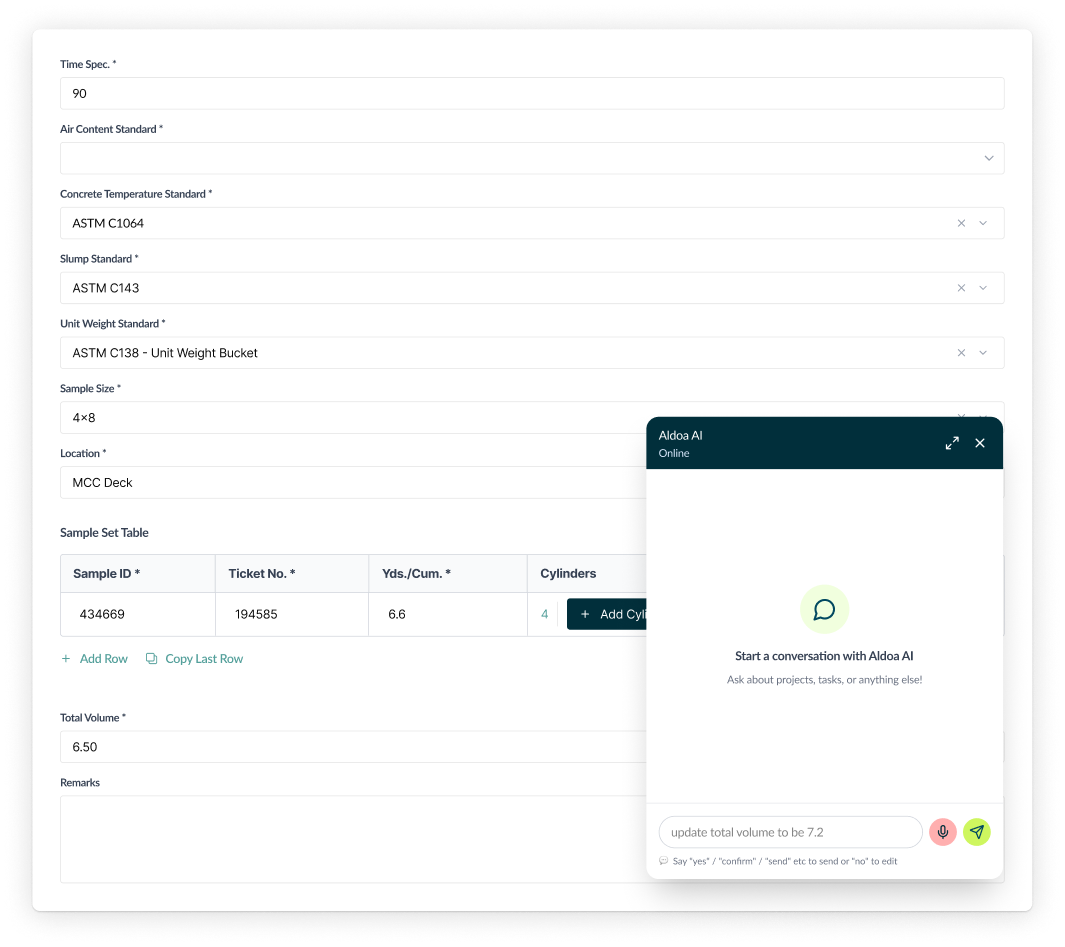
These features reduce double entry, prevent backtracking, and keep reports consistent without extra effort. Instead of AI being a separate tool, it becomes part of the way work gets done.
Customer Support and Collaboration
Existing solutions often have a large support operation, but it can feel bureaucratic and distant. Long form cycles and limited configurability make it hard for teams to move quickly.
Aldoa: High-Touch Support and Co-Development
Aldoa is built to be collaborative—not just with your data, but with your team. We:
- Assign you a dedicated onboarding and support team
- Offer live support, not just ticket-based help
- Engage in regular roadmap reviews with clients
- Want your feedback—and we use it to build better features fast
Our mission is simple: build a better product by listening to the people who use it every day.
| Benefit |
Why It Matters |
| Lower pricing |
No $99/user fees or surprise costs |
| Soil boring logs (in development) |
Built specifically for geotechnical workflows |
| Unlimited eSignatures |
No per-signature pricing or third-party tools |
| Better GIS and mapping |
Handle multiple locations per project with ease |
| Faster form deployment |
Get your forms live in days, not months |
| In-platform report editing |
No external tools needed for PDF finalization |
| Custom dashboards and queries |
Real-time insights across regions and projects |
| Collaborative development |
Influence the roadmap by becoming a design partner |
| AI features in progress |
Cut manual work and speed up reporting |
Final Thoughts: a Modern Alternative For Modern Engineering Teams
Legacy platforms helped digitize the first wave of engineering data collection. But geotechnical and CMT firms now need tools that match the speed, scale, and precision clients expect today.
Aldoa is a modern field and lab data management platform for CMT and geotechnical teams. It delivers mobile forms for field techs, review and calculations for PMs and lab techs, a single source of truth, and an easy rollout that is intuitive and flexible. Teams get quicker turnaround and better data quality.
If you are dealing with high costs, slow change cycles, and reporting workarounds, it is time to explore a platform built for the next generation of engineering workflows.
Ready to See Aldoa in Action?
Book a demo today and discover why teams are making the switch to Aldoa—for a better experience, lower cost, and smarter workflows.
.svg "Aldoa Assets (3)")