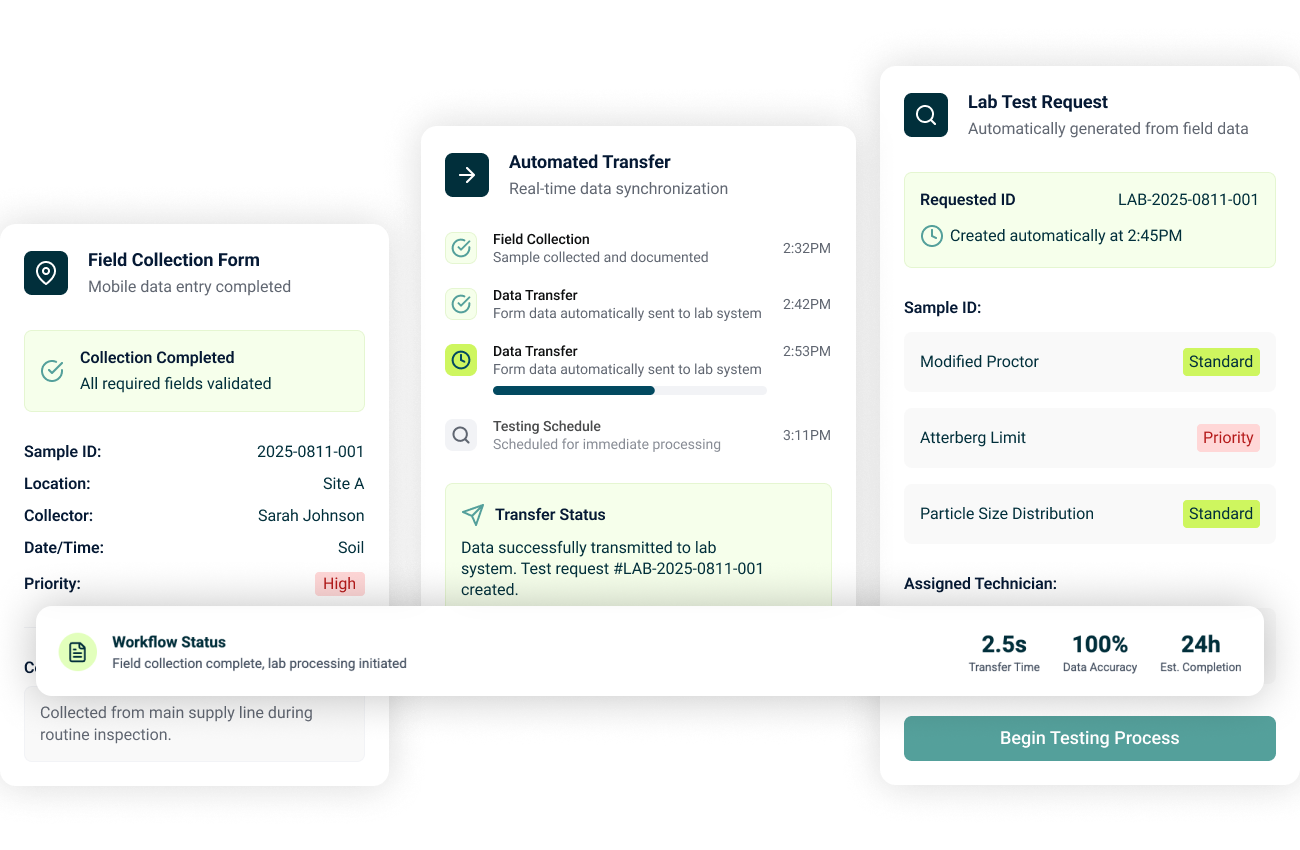
One System for Your Entire Workflow

Aldoa helps geotechnical and materials testing teams save time, reduce errors, and deliver results faster.

Scheduling & Dispatch Software for Field Teams

Plan work, assign staff, and keep projects moving. Create work orders, dispatch technicians, and give field staff everything they need before they arrive on site.

  • Work Orders and Assignment: Easily create new work orders and assign field staff based on availability.
  • Dispatch and Scheduling: Provide field staff with job details, test types, and maps in every assignment.
  • Full Visibility: Track assignment status, technician workload, and form completion to keep projects on schedule.
Field Data Collection

Field Data Collection Software

Capture accurate field data the first time. Replace paper forms and manual entry with mobile-friendly digital forms that sync instantly to the office.

  • Mobile-First Field Forms: Collect accurate, standardized data on any device—phone, tablet, or laptop—complete with photos, notes, and e-signatures.
  • Real-Time Sync to Office: Keep field and office teams connected with instant, bidirectional data syncing.
  • Technician-Friendly: An intuitive design and simple user experience allows for quick adoption in the field.

Cloud-Based Site Mapping for Testing Projects

See every test location and observation in one place. Turn static site plans into interactive, map-based views that connect locations, forms, and photos.

  • Map-Based Project View: Get a real-time, visual overview of your entire job site. Drop and categorize test locations, toggle between map and list views, and filter by test type, date, technician, or status.
  • Integrated Data & Forms: Link every pin to the right field forms, notes, and photos. Update data live from the field, keep everything in sync across teams, and eliminate the need for re-entry.
  • Digital Site Plans: Turn static site plans into interactive maps. Upload PDFs, drop pins, annotate directly, and layer key details.
Field-to-Lab Interconnectivity

Lab Management System (LIMS)

Connect the field and lab with real-time data flow. Aldoa’s LIMS gives lab teams instant access to field data, speeding up testing and reducing rework.

  • Field-to-Lab Interconnectivity: Keep lab and field teams perfectly in sync with real-time data sharing. Proctors, results, and sample statuses flow instantly between teams—eliminating delays, double entry, and miscommunication.
  • Sample & Test Management: Track every sample and test from drop-off to report with built-in chain-of-custody, status tracking, and customizable dashboards.
  • Industry-Specific Reporting: Automate ASTM, AASHTO, and DOT-compliant calculations, generate technical charts, and deliver branded, client-ready reports.

Technical Report Generation

Generate client-ready reports without manual formatting. Create standardized technical reports and soil boring logs directly from approved field and lab data.

  • Automated Report Generation: Pull in field and lab data instantly to auto-fill customizable templates. Include photos, site maps, and pre-configured calculations.
  • Smart Editing & Customization: Start with pre-built, industry-compliant templates, then fine-tune layouts, add narratives, or attach supporting documents to meet specific client needs.
  • Instant Report Delivery: Generate polished PDFs in one click, send directly from Aldoa, and track report status with built-in search and approval tools.
Project Management

Project Management for Field, Lab, and Office Teams

Keep projects on track from start to finish. Manage tasks, documents, and stakeholders without juggling spreadsheets or disconnected systems.

  • Task Tracking & Team Coordination: Assign responsibilities, set due dates, and monitor progress across field, lab, and office teams. Visualize workloads in list, calendar, or Gantt chart views.
  • Contact & Client Management: Manage all clients, subcontractors, and vendors in one searchable database. Track communication, project history, and invoices.
  • Document Management: Keep plans, reports, and attachments organized by project and task. Control access, link files to specific work items, and maintain a clear documentation trail for every project.

Time Tracking & Billing Software

Capture time, control billing, and simplify invoicing. Track hours, approve billable work, and generate invoices without switching tools.

  • Flexible Timesheets: Log hours by project, task, or test type from any device—field, lab, or office. Capture both billable and non-billable time with detailed descriptions.
  • Pre-Billing Review & Approval: Give managers complete visibility into submitted time and expenses. Review, adjust, or approve entries before invoicing to prevent errors.
  • Integrated Invoicing: Turn approved time and expenses into professional, itemized invoices in seconds. Sync directly with QuickBooks and customize billing formats to meet client and project needs.
Onboarding and Support for Aldoa Users

Your partner every step of the way

Connect with real people who care about your business. From onboarding to ongoing support, we make sure your team feels confident every step of the way.

  • Fast Setup: Get your team up and running in weeks, not months, with a white glove guided onboarding process.
  • Seamless Integration: Import your existing project and financial data, easily template your company forms, and connect Aldoa with the tools your team already uses.
  • Personalized Support: Access responsive, U.S. based support from people whop understand your business and are ready to help when you need it.
Group 27259
  • Why Our Customers Love Aldoa

    Aldoa's all-in-one solution saves us time and frustration by streamlining our field-to-office workflows. You won’t find anything as user-friendly as Aldoa anywhere else.

  • Integrations

    Connect your existing tools

    Your projects are complex, but your processes don’t have to be. Our modern integrations work with QuickBooks Online, QuickBooks Desktop, and Microsoft 365. 

    Mask group (2)
    Mask group 1 (1)
    Mask group 2 (1)
    Built for consultants and engineers

    Frequently Asked Questions

    How much does Aldoa cost?

    To provide you with an accurate price, we first need to understand your team's needs. Our pricing is based on the number of seats, functionality, and use case. Just as you need to understand the scope of work before sending a proposal for a project, we need to gather more information to help you get started.

    Do I need to replace my existing accounting system to use Aldoa?

    No. In order to use Aldoa’s project management tools, you don’t need to switch off any of your existing technology solutions.

    How long will it take to get set up?

    We can get you up and running on Aldoa immediately. Our customer support and onboarding team can help you move existing projects and data into our system so that you don’t need to manually enter information to get started.

    Are you going to charge me for onboarding and training?

    No. Our annual subscription includes unlimited onboarding support, training, and support. You’ll never get a bill from us other than the annual subscription.

    Are you available for support?

    Yes! We are available during normal business hours to help answer any questions. We also are happy to schedule 1-on-1 or group training sessions, free of charge!

    Ready to Modernize Your Workflow?

    See how Aldoa simplifies scheduling, field data collection, lab management, and technical reporting for geotechnical and materials testing firms.